Name the decision-makers.
Alex coordinates. Casey represents operations. Priya covers identity. Taylor handles communications. Jordan facilitates.
● FACILITATOR EDITION · RELEASE 2026.10.18
Run one simulated exercise. Record the decisions. Turn the gaps into owned actions and Outlook follow-ups.
A guided sample of the product you download. Real interface images. Invented exercise data.
This is a simulated example. Names, findings, evidence and outcomes are invented. No system was tested. Closed status illustrates the field; it is not a customer result.
BEFORE THE MEETING
Allow 60–90 minutes. Assign a facilitator and a recorder. Agree the scope before the first prompt.
Alex coordinates. Casey represents operations. Priya covers identity. Taylor handles communications. Jordan facilitates.
Discuss the vault, critical services and independent access. Record assumptions. Keep passwords and recovery codes out of the exercise.
Look for the recovery status. Return in the same browser and application location. Export JSON for a separate backup.
INSIDE THE EXERCISE
Choose a step to inspect the released interface. The screenshots use this case. Your entries start with your own exercise.
STEP 1 · EXERCISE DETAILS
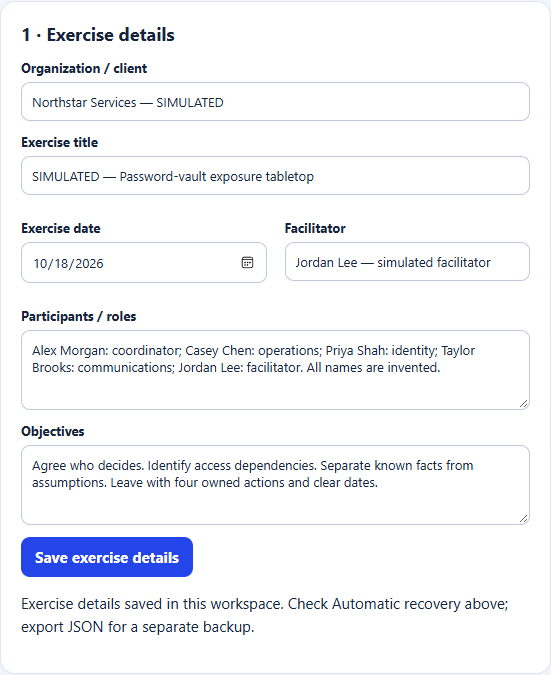
THE DECISION RECORD
Four prompts lead to four decisions. Each decision has a named owner, a reason and an open question.
Name a coordinator and deputy. Keep one decision record. Require approval before any simulated change.
Still open: Who covers the team if both leads are unavailable?
Prioritize identity, payroll and customer-service access. Link each credential class to its owner and service.
Still open: Which service accounts are missing from the inventory?
Keep a separate coordination channel. Plan an authorized access rehearsal after the discussion.
Still open: Where is the latest approved test record?
Separate confirmed facts from unknowns. Name the reviewers and set the next update time.
Still open: What evidence would change the stakeholder update?
SAVE, THEN CHECK
Save observation stays in step 4. Continue to corrective actions saves open observations and moves to step 5. Actions follow the same pattern.
After the summary, check report readiness. Follow a linked Step number to the field that needs attention. An item clears after Save, not while you type.
Inspect the saved summary →
AFTER THE MEETING
In step 7, click Display follow-up actions. All open actions start checked. For one file per action, uncheck the others and download. Change the checks for the next file.
These controls choose an example calendar file. They do not change your exercise. The released app accepts 1–52 reviews.
| Include | Corrective action / decision | Owner | Due | Status |
|---|
Sample only. Import into a test calendar. To make a separate file, uncheck the actions you just exported, check the next action or group and download again.
WHAT 1 VERSUS 2 MEANS
Action 2 is due 2 November at 09:00 Eastern. Its review interval is seven days.
1 review: 3 November only.
2 reviews: 3 and 10 November.
The deadline, advance checkpoint and escalation appointment are separate. A repeat interval of 0 turns recurring reviews off.
Seven days before the deadline.
09:00 Eastern · 15-minute appointment.
The day after the deadline.
Three overdue days; contact set in this example.
Seven days after the first review.
Send the file to people who should import their own copy. Or import it yourself, add attendees in Outlook and send invitations. End the series in Outlook when the work is complete. Closing an action here does not change imported appointments.
Escalation is a dated checkpoint, not a conditional email. Outlook controls alerts; test actual reminders in your account.
LEAVE WITH SOMETHING USEFUL
The sample report and action CSV below come from the released application's own exporters. Calendar files use the same exporter.
Exercise details, decisions, observations, summary and the four-action improvement plan.
Open the sample report ↗The original five columns: action, owner, due date, priority and status.
Download sample CSV ↓The app also exports an image-based PDF report, printable HTML with selectable text and a portable JSON workspace backup.
JSON restore accepts v1–v4 backups up to 1 MB. Recovery separately keeps unfinished editor drafts.THE FACILITATOR'S CLOSE
Use the report to close the discussion. Use the action list to track the work. Use Outlook to bring the right people back to it.
US$49 once per organization. One-time purchase. Applicable tax is shown at checkout.